Wednesday, April 16, 2008

Microsoft SQL Server 2008 White Paper: Reporting Services

One of the biggest features I see out of 2008 is the Report Designer application.  This removes the need to purchase Visual Studio or a 3rd party add-in for building reports, and makes it much easier to create adhoc queries.

Microsoft SQL Server 2008 Reporting Services provides a complete server-based platform that is designed to support a wide variety of reporting needs, including managed enterprise reporting, ad-hoc reporting, embedded reporting, and Web-based reporting, to enable organizations to deliver relevant information where needed across the entire enterprise. Reporting Services 2008 provides the tools and features necessary to author a variety of richly formatted reports from a wide range of data sources, and provides a comprehensive set of familiar tools used to manage and secure an enterprise reporting solution. Reports are processed and delivered quickly and effectively, enabling users to either receive reports automatically through subscriptions, to access reports from a central report repository on an ad-hoc basis, or to consume reports in the context of their business processes through reports directly embedded into their business or Web applications.

Microsoft SQL Server 2008 White Paper: Reporting Services

Common Solutions for T-SQL Problems - Home

A big problem with large systems is blocking.  This article can help troubleshoot why your database is "just hanging out" when it should be doing something.

Troubleshooting Deadlocks in SQL Server
Jonathan Kehayias, March 17, 2008

One of the more difficult/frustrating things to isolate and eliminate in SQL Server are deadlocks. In all but the rarest exception, deadlocks are a side effect of blocking and not a SQL Server Bug. They can generally be resolved by changing application or stored procedure code to access tables in the same logic order, or by changing the actual database schema or indexing structures. The first step in Deadlock elimination is to identify what two statements are actually causing the deadlocks to occur. In some cases, there may be more than just two statements that contribute to a deadlock. The methods available to troubleshoot deadlocks in SQL Server differ between SQL Server 2000 and SQL Server 2005.

Common Solutions for T-SQL Problems - Home

Common Solutions for T-SQL Problems - Home

Includes some details on record exclusion with EXCEPT.

Solutions for Common T-SQL Problems

Information presented in this WIKI represents the suggestions, ideas, and opinions of Volunteer Moderators and Answerers who support the Microsoft MSDN SQL Server Forums. (Unless specifically stated otherwise, nothing should be construed to represent the official positions or opinions of Microsoft and/or its Employees.)

Common Solutions for T-SQL Problems - Home

How can I update Multiple Tables at once

One way to update multiple tables in SQL.  Hint - use a view.

How can I update Multiple Tables at once
"CAN'T BE DONE" -- Crazy boy

How can I update Multiple Tables at once

Thursday, April 10, 2008

DB on GPUs

Upgrade your video card - get better database performance?  Perhaps in the near future...


Execution time of a predicate evaluation with 60% selectivity by a CPU-based algorithm and a GPU-based algorithm. Timings for the GPU-based algorithm include the time to copy data values into the depth buffer. Considering only the computation time, the GPU is nearly 20 times faster than a compiler-optimized SIMD implementation

DB on GPUs

I want some Moore - Short circuiting Sql Parameters


OR Conditions

Run this statement:

SELECT * FROM t1 
WHERE id = 3
OR id / 0 = 1

Here it is a whole different story than above with only AND conditions. Here you immediately see the error "Divide by zero error encountered". If you take a closer look you'll see that we never get to the execution plan phase. Why does this differ so much from the AND conditions?  Because OR's immediately mean Table/Index scan. Therefore no parameterization is done and at the query evaluation time all of the values are known. This is when the divide by zero is caught before the execution plan is even built or taken from cache and our query fails. It doesn't matter that our first condition is already true.


I want some Moore

CREATE ASSEMBLY Permissions - Could not obtain information about Windows NT group/user - SimonS Blog on SQL Server Stuff


CREATE ASSEMBLY Permissions - Could not obtain information about Windows NT group/user

If you encounter this

Could not obtain information about Windows NT group/user <MyDomain>/<MyName>, error code 0x5.

When you try and CREATE an ASSEMBLY, you might think well I'm not connected as that user. The user it sqawks about is the database owner.

I run on a laptop and often find myself not connected to the domain (although I can still log in with cached domain credentials). When I create a database the database automatically becomes owened by my domain account so when I then try and create an assembly it sqawks because it can't verify the domain account that owns the database.

The simple way around this is to create a sql user account and change the database owner to that user.

CREATE ASSEMBLY Permissions - Could not obtain information about Windows NT group/user - SimonS Blog on SQL Server Stuff

Tuesday, April 08, 2008

Megginson Technologies: Land and Hold Short » Blog Archive » Cost of owning a plane in 2007

Something tells me I will not be owning a plane any time soon.

Here’s what it cost to own and operate a 1979 Piper Warrior II in Ottawa, Canada in 2007 with 80 hours air time (a bit more flight time, of course). Since the US and Canadian dollars are basically at par now, there’s no need to convert:

TOTAL:
$9,801.08
$122.51/hr

These are real costs, including sales taxes, not the BS costs you hear people throwing around at the airport. Reserves are $20/hour for engine and paint. I also pay about $500/year for charts and recurrent training, but I’d pay the same as a renter, so I don’t count those as ownership costs.

Megginson Technologies: Land and Hold Short » Blog Archive » Cost of owning a plane in 2007

Database maintenance routines

List of maintenance procedures.

Database maintenance routines

EDIT: Updated link to the new version of isp_ALTER_INDEX.

Over the past couple of weeks, I have posted various database maintenance stored procedures.  Here's a listing of them:

Do not put these in the master database.  An Admin database should be created where non-application specific objects are put.  All of the stored procedures are designed so that they do not need to be in any particular database.

Use them at your own risk.  If you don't use them, at the very least create your own.  Don't use the maintenance plan wizards or the sqlmaint utility!

Database maintenance routines

SQL Server Forums - SQL Server Frequently Asked Questions FAQ

Frequently Given Answers in SQL Server Forums.

All Forums
General SQL Server Forums
New to SQL Server
SQL Server Frequently Asked Questions FAQ

SQL Server Forums - SQL Server Frequently Asked Questions FAQ

Data Models - ESRI Support

Testing Spatial & Geography support in SQL 2008?  Got Data?

Academic and industry leaders collaborate with ESRI to create and design data model templates that can be used with one GIS platform. The result is this set of data model structures that can be implemented for each of the industries and scientific disciplines that ESRI serves.

Read about the goals and process in the Introduction to ArcGIS Data Models, and visit the Data Model tips and tricks page designed as a resource for common methods and best practices.

Data Models - ESRI Support

Know Dot Net - NET Refactor - SQL Parameters

More tools to remove dynamic SQL from applications.

Cleaing up Dynamic SQL

Using Dynamic SQL is a bad habit that many developers must admit to having used. And, even worse, when you start to use it, you don't just use it once or twice. You use it so many times over a project that you may be ashamed to admit it. Old habits die hard!. Dynamic SQL is dangerous. On the Web, it opens your site to injections attacks and hacking. In a desktop or Client Server application, it opens the door to the old single quote (name = O'Rielly) bug-a-boo, to which all who would be honest, have been a victom. The SQL Parameters menu option of NET Refactor, found under the SQL Refactor Menu, converts dynamic parameters to the use of Database Command.Parameters automatically.

Know Dot Net - NET Refactor - SQL Parameters

What did you learn today? - Cool new features I found in SQL 2005

PERSISTED computed columns and the OUTPUT clause are 2 "new" features I discovered in SQL 2005 while researching SQL 2008.

OUTPUT Clause

A lot of people already know about this pretty cool feature, but I didn’t. In the past, if you do an insert to a table, and the table has an identity column, after the insert, you would look at @@IDENTITY or scope_identity(). That always seemed hackish to me.

You can now add an OUTPUT clause to the end of an INSERT, UPDATE, or DELETE statement. That will return the rows changed by the statement.

INSERT INTO Person.Address

(AddressLine1,AddressLine2,City

,StateProvinceID,PostalCode,rowguid,ModifiedDate)

VALUES(@AddressLine1,@AddressLine2,@City

,@StateProvinceID,@PostalCode,@rowguid,@ModifiedDate)

OUTPUT INSERTED.AddressID;

You use the pseudo tables INSERTED and DELETED, just like in triggers.

What did you learn today? - Cool new features I found in SQL 2005

Monday, April 07, 2008

Dan's Notes: BizTalk replace functoid trick

Of course, you could also replace functoids the easy way. :)

If you need to change a functoid that has many links associated with it, instead of deleting the functoid and creating a new one and re-adding all the links, you can just drop the new functoid on the old functoid in the grid. All links and parameters are preserved, just the functoid changes.

Dan's Notes: BizTalk replace functoid trick

Reverse Engineering BizMaps in BizTalk

Interesting trick with BizTalk Maps.   The Mapping Editor uses XML in the background.  For manipulating maps, use the Open With shortcut to your favourite XML editor.  i.e. Notepad.

Notice below that there are ID's set for individual Functoids.  These functoids are stored in C:\Program Files\Microsoft BizTalk Server 2006\Developer Tools\Microsoft.BizTalk.BaseFunctoids.dll

Looking at this class library in Reflector, you can browse to get the ID of the functoid under Base.ID.   For the StringLeftFunctoid() class it is 0x66.  It is stored as hex, so dropping the 0x and converting the value to decimal using http://www.easycalculation.com/hex-converter.php gives you 102.

By further reverse-engineering of the BizTalk.BaseFunctoids.dll library, you can see some different styles of implementing the various functoids.

If you don't like working with design tools for maintenance and simple things like changing base functoids, then you can modify this file, at the risk of blowing everything up.

Now if only you could do this mapping in Visio... and execute it... now that would be a powerful Data Design/ETL/Workflow tool.

<?xml version="1.0" encoding="utf-16"?>
<!-- Generated using BizTalk Mapper on Mon, Apr 07 2008 02:03:28 PM -->
<mapsource Name="BizTalk Map" BizTalkServerMapperTool_Version="2.0" Version="2" XRange="100" YRange="420" OmitXmlDeclaration="Yes" TreatElementsAsRecords="No" OptimizeValueMapping="Yes" GenerateDefaultFixedNodes="Yes" PreserveSequenceOrder="No" CopyPIs="No" method="xml" xmlVersion="1.0" IgnoreNamespacesForLinks="Yes">
  <SrcTree>
    <Reference Location=".\KeyStats.xsd" />
  </SrcTree>
  <TrgTree>
    <Reference Location=".\KeyStats_2.xsd" />
  </TrgTree>
  <ScriptTypePrecedence>
    <CSharp Enabled="Yes" />
    <ExternalAssembly Enabled="Yes" />
    <VbNet Enabled="Yes" />
    <JScript Enabled="Yes" />
    <XsltCallTemplate Enabled="Yes" />
    <Xslt Enabled="Yes" />
  </ScriptTypePrecedence>
  <TreeValues>
    <TestValues />
    <ConstantValues />
  </TreeValues>
  <Pages>
    <Page Name="Page 1">
      <Links>
        <Link LinkID="1" LinkFrom="1" LinkTo="/*[local-name()='&lt;Schema&gt;']/*[local-name()='KeyStats']/*[local-name()='ShortName']" Label="" />
        <Link LinkID="2" LinkFrom="1" LinkTo="/*[local-name()='&lt;Schema&gt;']/*[local-name()='KeyStats']/*[local-name()='Exchange']" Label="" />
        <Link LinkID="3" LinkFrom="1" LinkTo="/*[local-name()='&lt;Schema&gt;']/*[local-name()='KeyStats']/*[local-name()='IndustryName']" Label="" />
        <Link LinkID="4" LinkFrom="1" LinkTo="/*[local-name()='&lt;Schema&gt;']/*[local-name()='KeyStats']/*[local-name()='FCFF']" Label="" />
        <Link LinkID="5" LinkFrom="1" LinkTo="/*[local-name()='&lt;Schema&gt;']/*[local-name()='KeyStats']/*[local-name()='FCFE']" Label="" />
        <Link LinkID="6" LinkFrom="1" LinkTo="/*[local-name()='&lt;Schema&gt;']/*[local-name()='KeyStats']/*[local-name()='MarketCap']" Label="" />
        <Link LinkID="7" LinkFrom="1" LinkTo="/*[local-name()='&lt;Schema&gt;']/*[local-name()='KeyStats']/*[local-name()='MarketCap_USD']" Label="" />
        <Link LinkID="8" LinkFrom="1" LinkTo="/*[local-name()='&lt;Schema&gt;']/*[local-name()='KeyStats']/*[local-name()='FirmValue']" Label="" />
        <Link LinkID="9" LinkFrom="/*[local-name()='&lt;Schema&gt;']/*[local-name()='KeyStats']/*[local-name()='KeyStats_Child1']" LinkTo="2" Label="" />
        <Link LinkID="10" LinkFrom="2" LinkTo="/*[local-name()='&lt;Schema&gt;']/*[local-name()='KeyStats']/*[local-name()='Symbol']" Label="" />
      </Links>
      <Functoids>
        <Functoid FunctoidID="1" X-Cell="56" Y-Cell="215" Functoid-FID="376" Functoid-Name="Nil Value" Label="">
          <Input-Parameters />
        </Functoid>
        <Functoid FunctoidID="2" X-Cell="56" Y-Cell="212" Functoid-FID="106" Functoid-Name="String Extract" Label="">
          <Input-Parameters>
            <Parameter Type="Link" Value="9" Guid="{5AE7B85F-255C-498D-BF5C-1F1DBABF180B}" />
            <Parameter Type="Constant" Value="1" Guid="{7DF87C5C-729A-4726-B4E7-F51FD52CC659}" />
            <Parameter Type="Constant" Value="3" Guid="{80449EC2-724D-45E8-B64F-67EA60B42D94}" />
          </Input-Parameters>
        </Functoid>
        <Functoid FunctoidID="3" X-Cell="53" Y-Cell="213" Functoid-FID="101" Functoid-Name="String Find" Label="">
          <Input-Parameters />
        </Functoid>
      </Functoids>
    </Page>
  </Pages>
</mapsource>

Friday, April 04, 2008

Generate dynamic SQL statements in SQL Server - Program - SQL Server - Builder AU


sp_executesql or EXECUTE()

There are two ways to execute dynamic SQL in SQL Server: use the sp_executesql system stored procedure or the EXECUTE() operator. Sometimes the two methods can produce the same result, but there are differences in how they behave.

The system stored procedure sp_executesql allows for parameters to be passed into and out of the dynamic SQL statement, whereas EXECUTE() does not. Because the SQL statement is passed into the sp_executesql stored procedure as a parameter, it is less suseptible to SQL injection attacks than EXECUTE(). Since sp_executesql is a stored procedure, passing SQL strings to it results in a higher chance that the SQL string will remain cached, which should lead to better performance when the same SQL statement is executed again. In my opinion, sp_executesql results in code that is a lot cleaner and easier to read and maintain. These reasons are why sp_executesql is the preferred way to execute dynamic SQL statements.

Generate dynamic SQL statements in SQL Server - Program - SQL Server - Builder AU

Ben Hall's Blog: Creating partition tables in SQL Server 2005


Creating partition tables in SQL Server 2005

Partition Tables is a feature of SQL Server 2005 which allows you to separate your data into blocks (partitions) of data to improve performance and manageability as each partition can be stored in its own filegroup, which in turn can be on a separate disk array. In this post, I will cover how to partition your table, the table will contain a series of orders which I want to partition based on their order date.

The first thing I want to do is create a database.

CREATE DATABASE PartitionTest
GO

USE PartitionTest
GO

Next, I want to create a table which will contain all of my 'orders'.

CREATE TABLE Orders (ID INT NOT NULL, OrderDate DATETIME NOT NULL)

Next, I got SQL Data Generator to generate me 10 million 'Orders' for the table.  This gave me a large number of dates between 01/01/1953 and 30/12/2010 (values I had set) - so a nice big table which really needs to be partitioned. With that in place, we can create our partition. 

First, we need to create a partition function, give it a name and the data type we are partitioning based on - in this case DateTime. We need say RANGE LEFT (anything on the left hand side goes into the partition), we then list the series of values we want to split the data based on.  In this case, anything below 31/12/1950 goes into partition 1, between 1/1/1951 and 31/12/1960 into partition 2 etc

CREATE PARTITION FUNCTION OrderDateRangePFN(datetime)
AS
RANGE LEFT FOR VALUES ('19501231 23:59:59.997', --YYYYMMDD
                        '19601231 23:59:59.997',
                        '19701231 23:59:59.997',
                        '19801231 23:59:59.997',
                        '19901231 23:59:59.997',
                        '20101231 23:59:59.997',
                        '20201231 23:59:59.997')

At this point, we create a partition schema.  In this case, I'm using saying all the partitions should be stored in the primary filegroup, however this is where we would allocate the partitions to separate filegroups.

CREATE PARTITION SCHEME OrderDateRangeScheme AS
PARTITION OrderDateRangePFN
ALL TO ([PRIMARY])

At this point, we have a table with 10 millions rows, a partition function and a partition schema. However, nothing links the partition to the table.  What we need to do is create a new Primary Key which we can set the partition schema on. If you have any existing keys, they will need to be dropped and re-created with the partition schema included.

ALTER TABLE Orders
ADD CONSTRAINT OrdersPK
   PRIMARY KEY CLUSTERED (OrderDate, ID)
ON OrderDateRangeScheme(OrderDate)
GO

If the table wasn't already created, we could include the partition schema in the create table script.

CREATE TABLE Orders (ID int, OrderDate DATETIME) ON OrderDateRangeScheme(OrderDate)
GO

In the above function, the year 2000 partition was missing. If we wanted to include this we would alter the function and include a split range

ALTER PARTITION FUNCTION OrderDateRangePFN () split RANGE ('20001231 23:59:59.997')

After executing all of this, your table will successfully be partitioned. To verify the details of the partition, there are a few queries we can execute.

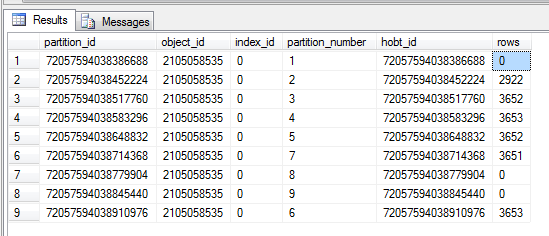
The system view partitons contains all of the information, we can query this to return all the partition information for a table.

SELECT * FROM sys.partitions
WHERE OBJECT_ID = OBJECT_ID('Orders')

This returns the partition number and how many rows are in each partition.  This is useful for identifying if your partitions are split correctly or if one partition needs to be split down more.

image

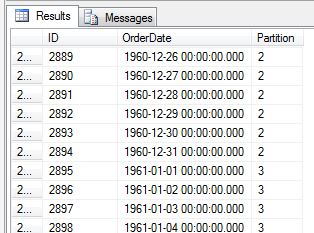
The other way is to use a $Partition, this gives the partition number for the row of data. This allows you to see what data is in what partiton

SELECT *, $Partition.OrderDateRangePFN(OrderDate) AS [Partition] FROM [Orders] ORDER BY [Partition]

image

More information visit http://www.simple-talk.com/sql/sql-server-2005/partitioned-tables-in-sql-server-2005/

Ben Hall's Blog: Creating partition tables in SQL Server 2005

Thursday, April 03, 2008

The Bit Bucket (Greg Low) : SQL Server 2008: Interesting Full-Text Dynamic Management Function

SQL 2008 word parser using FTS.

That's really sweet as it lets you parse text into words. The 1033 was the locale I chose and the other two parameters were a stop word list (formerly called a noise word list) and whether or not it should be accent sensitive.

The Bit Bucket (Greg Low) : SQL Server 2008: Interesting Full-Text Dynamic Management Function

Visual Studio 2005 with SQL 2008

If you want to add a database project to Visual Studio 2005 with SQL 2008, one way is to use an ODBC reference.

The SQL Native client reference will only work for SQL 2000/2005.

Vadivel's blog: How to find out recently run queries in SQL Server 2005?

A realtime view of your SQL Server 2005 queries.

How to find out recently run queries in SQL Server 2005?

Prior to SQL Server 2005 if we want to find out the list of recently run queries we need to depend on SQL Profiler.
Now in SQL Server 2005 the life has become more easier(!). With the help of of an Dynamic Management Views (DMV) and a table valued function we can list the required result.
Points to note:
1. sys.dm_exec_query_stats -- This DMV returns aggregate performance statistics for cached query plans. The view contains one row per query statement within the cached plan, and the lifetime of the rows are tied to the plan itself. When a plan is removed from the cache, the corresponding rows are eliminated from this view.
2. sys.dm_exec_sql_text -- This table valued function returns the text of the SQL batch that is identified by the specified sql_handle
Solution:
Select
dmStats.last_execution_time as 'Last Executed Time',
dmText.text as 'Executed Query'
from
sys.dm_exec_query_stats as dmStats
Cross apply
sys.dm_exec_sql_text(dmStats.sql_handle) as dmText
Order By
dmStats.last_execution_time desc

Vadivel's blog: How to find out recently run queries in SQL Server 2005?

Tuesday, April 01, 2008

Patrick Wellink - BizTalk Templates


Now its only a matter of seconds to create the projects. The naming convention should be SomeProject.ServiceKind,ServiceName. The templates really expect a dotted name where tle last part after the last dot is the actual service name.

  1. If you want to try this yourself, extract the files in the zip file ESB Concept Scenarios.zip to the directory C:\Program Files\Microsoft BizTalk Server 2006\Developer Tools\BizTalkProjects\ESB Concept Scenarios, so that the directory will contain two files. SimpleTemplate.ico and SimpleTemplate.vsz.
  2. Next you extract the following file SimpleTemplate.zip to the following directory BizTalkWizards. The result should look the same as the picture above.
  3. Next Start Visual Studio, Create a new BizTalk Project, Select SimpleTemplate and see stuff happen. (Don't forget the name yoy enter for the project should be in the form , SomeProject.ServiceKind,ServiceName otherwise it won't work.

If  You don't like the template or want to change it, simply go to the BizTalk Wizard directory and perform the following steps.

  1. Select the template you want to change.
  2. Next go to the 'Templates\1033\OriginalProject' directory.
  3. Open the solution.
  4. Make any change you want, and save the project.
  5. Copy only the Orch / Map and XSD one level up. Do not copy the SLN and BTPproj files. (Have a look in the notepad at both of them and you will probably spot the diffrencies).

Patrick Wellink

Benny Mathew's BizTalk Blog - Open Source tools


Open Source BizTalk Utilities on CodePlex

I am sure most of you (not talking about the BizTalk gurus out there J) have worked with some of the open source utilities available for BizTalk such as the BizTalk Adapter Wizard or the BizTalk Server Pipeline Component Wizard or BizUnit. However what some of you may not know is the wealth of other open source utilities for BizTalk available on CodePlex.

Here are some of the interesting ones and their descriptions as found on CodePlex :

SDC Tasks Library - . The SDC Tasks are a collection of MSBuild tasks designed to make your life easier. You can use these tasks in your own MSBuild projects. You can use them stand alone and, if all else fails, you can use them as sample code.

BizUnit - Framework for Automated Testing of Distributed Systems - BizUnit enables automated tests to be rapidly developed. BizUnit is a flexible and extensible declarative test framework targeted that rapidly enables the automated testing of distributed systems, for example it is widely used to test BizTalk solutions. BizUnit is fully extensible. Its approach is to enable test cases to be constructed from generic reusable test steps, test cases are defined in XML which allows them to be auto-generated and also enables the ‘fixing up’ of Url’s for different environments, e.g. test, staging and production environments. Defining test cases in XML enables test cases to be auto-generated.

BizTalk Server Pattern Wizard - The BizTalk Pattern Wizard is an extensible tool to help you capture, share, and reuse your orchestration best practices. By using the BizTalk Pattern Wizard, you can capture a best practice, turn it into a generalized and configurable pattern, and share that pattern with the rest of your team or the entire BizTalk community. The wizard comes with over a dozen patterns ready for implementation in your next project.

WCF Adapter for BizTalk Server 2006

BizTalk Adapter Wizard for BizTalk Server 2006 - The BizTalk Adapter Wizard for BizTalk Server 2006 is a Visual Studio 2005 project wizard which creates all of the framework code for your custom BizTalk adapter. The adapter wizard is accessible from the Visual Studio menu: File - New - Project - BizTalk projects.

BizTalk Server 2006 Documenter - Creates compiled help files for a given BTS 2006 installation. This tool can be run on an ad-hoc basis using the UI or from the command line as a post build/deploy task to create a compiled help file describing a BTS 2006 installation. It will compile: BTS Host configuration, Send/Receive port configuration, Orchestration diagrams, Schema and Map content, Pipeline process flow, Adapter configuration, Rule engine vocabularies and policies, More… and publish them as compiled help files. Optionally you can embed custom HTML content and custom descriptions for all BTS artifacts to produce a more customized look and feel to the CHM output

BizTalk Server 2006 Orchestration Profiler - Creates CHM report files illustrating the level of coverage for specified BizTalk orchestrations. This tool can be run to gain a consolidated view of orchestration tracking data for a specified period of time to help developers get an idea of how their orchestrations are being processed and how much coverage they are getting in their testing. In addition to simple coverage information the data presented helps to identify latency and code path exceptions by highlighting long running and error prone orchestration shapes.

PowerShell BizTalk Provider - A full PowerShell provider for exposing BizTalk Server as a filesystem. Administer your BizTalk installation. List all applications / orchestrations / Schemas. Stop an application, enlist an orchestration ... Use the full power of the shell to script away the pain of GUI based mass-management.

MapCop - A program for testing BizTalk map files (.BTM) for a set of best practices.

BizTalk Instance Controller - Limit the number of instances of any BizTalk Service.

Have Fun!

Benny Mathew's BizTalk Blog

Blog BizTalk - » Install BizTalk Server 2006 Orchestration Designer for Business Analysts with Visio 2007

Here's how to configure Biztalk ORCH Orchestrator Plugin for Visio 2003 to use Visio 2007.

I found that the installer does look for this registry key: HKLM\Software\Microsoft\Office\11.0\Visio, but cannot find it. However, I found similar registry key for Visio 2007: HKLM\Software\Microsoft\Office\12.0\Visio. I exported this registry branch to a file and replaced all instances of “12.0″ to “11.0″.

After merging this file with the registry, I was able to install and use ODBA.

Blog BizTalk - » Install BizTalk Server 2006 Orchestration Designer for Business Analysts with Visio 2007

Monday, March 31, 2008

Unit Testing in SQL

Claypole's World has some good postings around unit testing with SQL.

Verification in unit testing is a process of test followed by assertion.  In this instance I have used a SQL assertion.  I.e. I have validated the results of the test with a sql statement.  This could have been done by running the sql test against the database in a c# application and testing the resulting ADO.NET dataset.  This would be known as a c# or code based assertion but I don't have the skills (yet) to do this myself. 

I have also seen people create rigs/harnesses/extensions to nunit to call sql statements or used more database friendly unit testing frameworks.  My colleague Howard van Rooijen has mentioned mbunit as an alternative. 

However, one recent development in this area has been Microsofts Team Edition for database professionals product.  This plugs into the Team Test framework of Team System and offers a Code Assertion option.  It's actually very friendly, gui/designer based, and I believe it is extensible whilst also hooking into the code coverage and unit test generation functionality.  However, I think I'll cover this in another post.

Claypole's World - The SQL Server Side

Not In v Not Equal - SQL Server Central

Interesting trick - use a derived table instead of a where clause to filter results.

Not In v Not Equal

By Ken Johnson, 2007/05/29


I ran the same series of tests on another occasion and the NOT IN query consistently outperformed the AND <> query. The results regularly go back and forth, much like the heads and tails of a coin toss. So, I have managed to convince myself that, despite the two execution times listed above, these two queries are, indeed, the same query as far as SQL Server is concerned -- at least on this day, on this server, for these queries (I still gravitate toward the comforting ambiguity of "it depends").

I mentioned earlier that there were several queries that outperform our basic AND <> and NOT IN queries (on this server on this day). Let's take a look at some of those queries and their execution results. The first alternative technique doesn't use a WHERE clause to filter out our integer values. It places the integer values into a UNION query and does a LEFT OUTER JOIN against that to filter out unequal rows. Here is what that query looks like:

   SELECT @results = count(filterCriterion_sv) 
FROM tbl_IN_VS_AND
LEFT OUTER JOIN (
SELECT 214 AS filterValue_val UNION
SELECT 215 UNION
SELECT 216 UNION
SELECT 217 ) AS tbl
ON tbl_IN_VS_AND.filterCriterion_sv = tbl.filterValue_val
WHERE tbl.filterValue_val IS NULL

It definitely feels odd, placing things you would normally put in a WHERE clause into a derived table then looking for absent values, but the performance benefit gives us a compelling reason to consider doing this. On this test run of 100 executions, this odd query was consistently outperforming the quicker of our original two queries by about 19%:


Not In v Not Equal - SQL Server Central

Database Encryption in SQL Server 2008 Enterprise Edition

This diagram seems to confirm my thoughts that TDE adds layers of complexity that may keep infrastructure people in a job for years to come...


Actually, TDE implementation is a 6-step process, so this diagram could be a bit misleading.  Perhaps the wavy arrows are turning this diagram into one of those hypnotizing optical illusions...

Summary: With the introduction of transparent data encryption (TDE) in SQL Server 2008, users now have the choice between cell-level encryption as in SQL Server 2005, full database-level encryption by using TDE, or the file-level encryption options provided by Windows. TDE is the optimal choice for bulk encryption to meet regulatory compliance or corporate data security standards. TDE works at the file level, which is similar to two Windows® features: the Encrypting File System (EFS) and BitLocker™ Drive Encryption, the new volume-level encryption introduced in Windows Vista®, both of which also encrypt data on the hard drive. TDE does not replace cell-level encryption, EFS, or BitLocker. This white paper compares TDE with these other encryption methods for application developers and database administrators. While this is not a technical, in-depth review of TDE, technical implementations are explored and a familiarity with concepts such as virtual log files and the buffer pool are assumed. The user is assumed to be familiar with cell-level encryption and cryptography in general. Implementing database encryption is covered, but not the rationale for encrypting a database.

Database Encryption in SQL Server 2008 Enterprise Edition

Writing Faster T-SQL - SQL Server Central

More on the numbers table trick.

Conclusions

I referred to the example presented by Wayne for the purpose of demonstration only. His article presented a practical scenario where we need large number of records generated for various performance tests. This article presents a more optimized TSQL code that generates data.

Writing Faster T-SQL - SQL Server Central

SQL 2008 TDE (Transparent Data Encryption)

Need to secure your databases from detach/attach & backup/restore methods?  I haven't heard of this requirement yet, however it may make sense for certain regulations.

Of course, transparent data encryption really means that you can still see the data if you're connected to SQL.  TDE just seems to add to the complexity of a backup/restore process.

Does it sound too good to be true: transparent data encryption? Well, it kind of is and kind of isn't. Let me explain. Transparent means that the application developer doesn't do anything (and if you have a third party app in which you can't do anything anyway, then this is even more important). Once enabled, the data is seemlessly protected.

But, protected from what? That's the part that needs a bit of explaining...

Kimberly L. Tripp: Improving *my* SQL skills through your questions! http://www.SQLskills.com/blogs/kimberly

Saturday, March 29, 2008

SSIS Junkie : SSIS: Data Profiling Task: Part 1 - Introduction

Jamie is tackling some exercises with the new Data Profiling task in SQL 2008.  I can see these being really useful when documenting a customer's database.  The data within a table is more important than the metadata wrapping it.

I aim to produce a blog entry dedicated to each type of profile request available with the Data Profiling Task. Here is a list of those entries thus far:

SSIS Junkie : SSIS: Data Profiling Task: Part 1 - Introduction

Friday, March 28, 2008

Radius Producer "Produces" No-nonsense SSAS Support - Prologika (Teo Lachev's Weblog)

In working a bit further with Report Designer, it looks like cube support is a lot lacking in this release.  No query designer for MDX?  No drag and drop for dimensions? Disappointing...

Looks like 3rd-party components like Dundas OLAP and 360 Degree Software still have room to grow this space.

Radius Producer is more ambitious than being a reporting tool only. It promotes colleboration among information workers. Users can save queries and report snippets, and subsequently share them on the Radius network. Think Zune but instead of music you share report gadgets. If you are on a lookout for a third-party reporting tool that generates RDL and provides a good support for SSAS, take a moment to evaluate the forthcoming release of Radius Producer.

Radius Producer "Produces" No-nonsense SSAS Support - Prologika (Teo Lachev's Weblog)

SQL Report Designer 2008, Governance, and "Power" Users

Power users tend to place the most demands on IT.  They want to run every report at the same time in different windows, and complain when they don't perform with Google-like speeds. Report Designer is one tool where you may want to place limits on your users, to ensure that they don't go blowing up the memory in your SQL Server 2008 install.

Resource Governor is the way to go here...

First thing we want to do is to limit the amount of CPU resources ad hoc queries can consume. Let’s say we do not want ad hoc queries to consume more than 20% of CPU cycles  and no more than 15% of available memory if there are other workloads running. To do this, we need to create a resource pool, place the ad hoc group in that resource pool and set limits on that pool.

2007 November archive at SQL Server 2008 Application Compatibility Blog

SQL Server 2008 Reporting Services Enhancements: Report Designer, Visualizations, and Tablix

Dundas Charts & Gauges, Tablix region controls, connections to SSAS, SAP & Essbase, Oracle, and best of all, No Report Model Required (unless you want one!).

The only thing it doesn't do is connect to the Business Objects Universe.

I think Reporting Services Report Designer in SQL 2008 is the killer app in SQL 2008 that many clients will like.  But what's it doing with my autoexec.bat file?

image

One of most important enhancements coming up in SQL Server 2008 Reporting Services is the new tablix region. In fact, I dare to predict that many folks will upgrade to SSRS 2008 just to get Tablix. What's tablix anyway?

Tablix = Table + Matrix

http://prologika.com/CS/blogs/blog/archive/2007/08/12/tablix-the-crown-jewel.aspx

The new enhancements have been designed to allow non-developers to create detailed and professional reports from within the available SQL data easily. The Report Designer is now a standalone application within SQL Server 2008. As the lab explains, the Report Designer can now be run separately from the Business Intelligence Development Studio. The new application can be used to create purchase orders, invoices, contracts, etc.

SQL Server 2008 Reporting Services Enhancements: Report Designer, Visualizations, and Tablix - IT Pro Tips


The need for a stand-alone Report Designer is real. True, developers, including myself, enjoyed the VS.NET Report Designer. But novice users were overwhelmed with the complexity of the VS.NET IDE environment. In addition, not all IT shops rejoiced over the idea to install VS.NET or BIDS just to author reports. Enters the SSRS 2008 stand-alone report designer.

http://prologika.com/CS/blogs/blog/archive/2007/08/07/the-new-kid-on-the-block-aka-stand-alone-report-designer.aspx

In addition to the features above, you can also now export to Word (I think this is licensed from Softartisans Officewriter). 

Some suggestions for features that may be useful that I didn't see yet:

  • Simplify data connections to Access, Excel, why not just add all the connections on ConnectionStrings.com?
  • Powerpoint export, maybe even Visio Export?  Xaml export?
  • Send to Onenote
  • Integration with Infopath
  • Tabs for Word & Excel preview inside designer.
  • Export to docx & xlsx format
  • Export to database

This is the lightweight, ad-hoc reporting tool many clients have been waiting for from Microsoft. 

SQL Server 2008 Improvement Pillars

Great tool for exploring the new features of SQL 2008 here.

With SQL Server 2008 February CTP release, customers can understand and get hands-on experience with the new capabilities that, with the release of SQL Server 2008, will help them support their mission-critical platform and enable pervasive insight across the enterprise. SQL Server 2008 lays the groundwork for innovative policy-based management that enables administrators to reduce their time spent on maintenance tasks. SQL Server 2008 February CTP provides significant enhancements and new features. 

SQL Server 2008 Improvement Pillars

Thursday, March 27, 2008

INNER JOIN on Sharepoint


This sample code demonstrates how to query a Microsoft Office SharePoint Server
2007 or Windows SharePoint Services list from inside SQL Server 2005 or later.

SQL Server CLR SharePoint Interface - Home

Text Mining with SQL 2008 - C is just noise

I see some interesting possibilities, however the limitation is the fact that FTS doesn't show you the positions of words within a document, making ranking a bit difficult.

Here's another function to show how Full Text determines which words work in your search and which ones are just "noise".

SELECT *
FROM sys.dm_fts_parser ('C or c or C++ or c++ or C# or c#', 2057, 0, 0)

Returns the following, which shows what you need to put in to get an exact search on c++, or c#. Capitalise the C. What’s also interesting is that C, C++ both relate to C as well but C# doesn’t, which means it C is removed from the noise word then C++ would return any document containing the word C.

SQL Server 2008 – iFTS Transparency – dm_fts_parser - SimonS Blog on SQL Server Stuff

Text Mining in SQL 2008

One way to build a tag cloud based on your full-text document repository - Data Management Views (DMVs) in SQL 2008.

If we had access to the words that had been indexed, it would have been clear what had happened. Well in SQL Server 2008 there are Two dynamic management views that return the keywords of the index, and the keywords of each document in the index. These dmvs are, sys.dm_fts_index_keywords and sys.dm_fts_index_keywords_by_document respectively.

select *
from sys.dm_fts_index_keywords (db_id(),object_id('Table_1'))

select *
from sys.dm_fts_index_keywords_By_Document (db_id(),object_id('Table_1'))

Note: The second dmv whilst is by document does not take a document id as a parameter. This means that this returns all the keywords for all the documents in an index. That will be a lot of rows. As an example if you store the definition from all_sql_modules in master in a table you will have ~ 1780 rows. When index using the default stop lists that will result in ~153000 rows being returned from sys.dm_fts_index_keywords_by_document.

SimonS Blog on SQL Server Stuff : Tips and Tricks

Wednesday, March 26, 2008

NullifyNetwork - Load testing SQL 2008

Could be useful for bombarding SQL...

I wanted to run a bunch of methods simultaneously on as many threads as possible to get the job done, but still wait at the end.  I know MS have something coming to solve this, but wanted a lightweight solution, so here it is:

public class Parallel

{

public static T[] ExecuteWaitAll<T>(Func<T>[] functions)

       {

List<T> resultSet = new List<T>();

int i = 0;

object lockObject = new object();

foreach (Func<T> function in functions)

              {

lock (lockObject)

                     {

                           i++;

                           function.BeginInvoke(delegate(IAsyncResult result)

                           {

lock (lockObject)

                                  {

                                         resultSet.Add(function.EndInvoke(result));

                                         i--;

                                  }

                           }, null);

                     }

              }

while (i > 0)

              {

Thread.Sleep(1);

              }

return resultSet.ToArray();

       }

}

To use this, you simply call it with a list of delegates you want to execute, and define the return type:

public void ExecuteWait()

{

List<Func<int>> list = new List<Func<int>>();

for (int i=0; i<100; i++)

       {

              list.Add(new Func<int>(delegate()

                     {

Thread.Sleep(1000);

return 1;

                     }));

       }

int[] quantity = Parallel.ExecuteWaitAll<int>(list.ToArray());

int count = 0;

foreach (int result in quantity)

       {

              count += result;

       }

}

The result is now valid for 100 executions but took a lot less time than 100 seconds to calculate.  You could of course just be running four things at the same time, all different using this.

NullifyNetwork

sqlcmd.exe -v Rocks - Passing parameters to command line SQL scripts

Useful in batch scenarios...

sqlcmd.exe -v Rocks

I'm the first to admit that I'm no database guru, but I occasionally have need to do something beyond just a simple SELECT, and I can usually manage to fumble my way through it.

The other day, the thing I was fumbling my way through was restoring a database from a backup a client had sent me. While I was doing it, I ran across a neat little option to sqlcmd.exe that I hadn't seen before, but which I definitely want to remember. It's the -v option, and it lets you pass parameters to your SQL script. In my case, I wanted to pass the current directory, so I could restore the database to files in whatever directory I happened to be running. Well, putting this in a .cmd file does the trick:

sqlcmd -E -i restoredb.sql -v root="%CD%"

Then I can use the root variable in my SQL script. All I have to do is reference it with the $(root) syntax, like this:

RESTORE DATABASE MyDB
    FROM DISK = '$(root)\mydb.bak'
    WITH REPLACE,
    MOVE 'mydb_data' to '$(root)\mydb.mdf',
GO

sqlcmd.exe -v Rocks

Global functions in SQL 2005/2008

Looking at a new version of software always seems to uncover features that would have been useful in the past.  How about this one?  A stored proc that is globally available across databases?  It's also available in SQL 2005.  Here's one of the engine mechanics of SQL hacking around.

So - I present to you sp_AllocationMetadata. I was having all kinds of trouble using it in other databases (trying to figure out a way to change database contexts in the SP) until I remembered that you can create an SP in master and mark it as a system object using the undocumented sys.sp_MS_marksystemobject SP. This makes any SP execute in the context of the database from where it is called - extremely useful when you're querying against a database's system catalog views

In Recovery... - Paul S. Randal on SQL Server

Next up I'm going to try and find time to look at FileStream data type and see whether it's useful to catalog the contents of a hard drive or something...

SQL Server Storage Engine : CHECKSUM and Tempdb

The most important part of any database is the data inside.  Like anything, there's always a tradeoff between performance and stability.  Better to err on the stability side.

ALTER DATABASE tempdb set PAGE_VERIFY CHECKSUM

For new installs of SQL Server 2008, all tempdbs will have CHECKSUM enabled by default. You can always disable it using ALTER DATABASE command but we don't recommend it. For databases upgraded to SQL Server 2008, you will need to explicitly enable CHECKSUM on the tempdb. We measured the performance impact of enabling CHECKSUM in tempdb and the impact is very low (<2% of CPU) which is similar to what you would expect in user database. Since the CHECKSUM is only computed when page is written to the disk, the added point is that there is no 'checkpoint' in tempdb, so a page in tempdb is written to disk ONLY under memory pressure. So you may not see as many CHECKSUM calculations in tempdb.

Note, this is not available in CTP-6 but will be available in RTM bits.

SQL Server Storage Engine : CHECKSUM and Tempdb

SNAC'ing on the new data types

With a new database server comes a new client.  SNAC (SQL Native Access Client) 10.0 introduces new functionality that developers should be aware of, to ensure backwards compatibility and "Y2K-style" issues don't crop up with calculations.

For new types with unlimited size the maximum size is represented as SQL_SS_LENGTH_UNLIMITED (value 0) in ODBC and ~0 in OLE DB. The APIs uses different values because each API has its own convention for representing values of unlimited size (and these conventions pre-date SNAC). Applications which do arithmetic based on the size returned in parameter and result metadata and which don't take account of this special case may misbehave. This is one reason why we recommend that applications moving to new driver/provider versions should not be deployed without thorough testing. Other version differences are described in SQL Server Books Online.

Microsoft SQL Server Native Client team blog : Microsoft SQL Server Native Client and Microsoft SQL Server 2008 Native Client

As it relates to HierarchyID below, in < SQL 2005 it is read as a binary blob image column, in SQL 2005 it is a varbinary column, in SQL 2005 it's a User-defined Type. 

More info on the new SQL 2008 features and UDTs.

UDT and CLR changes

SQL Server 2005 has a maximum length of 8k bytes for all user defined types (UDTs).  SQL Server 2008 has upped this limit to varbinary(max) – 2 GB.  This was needed for the TVP custom types.  You can now build up the structure on the client and pass it to the server in a single call as a Table Value Parameter.  Of course older clients will not know this, and they will be told the type is a varbinary(max) rather than the new TVP. The CLR runtime (the Dot Net runtime hosted inside SQL Server) was previously limited to 8k of state space as well.  This has been changed to also be 2GB.

The idea being that more stored procs will be written in C#/VB.Net in the future and the complex needs could not be met with the smaller state.  Now through TVPs you can pass GB’s of data to a stored proc (is that REALLY such a good idea?). Static methods in managed assemblies are now treated as User Defined Functions (UDFs).  This is something we have been working on within VistaDB as well.  And users can now create multi column user defined aggregates; you were previously limited to a single column.

http://www.vistadb.net/blog/articles/sql-2008-katmai-overview/

The HierarchyID Datatype in SQL Server 2008

Looking at the new HierarchyID datatype after a successful (?) installation of SQL 2008 CTP 6.  Drill down capabilities are usually something associated with OLAP.  With the HierarchyID data type, these tree/org chart capabilities fall further into the SQL realm.

At first glance, I notice some immediate quirks for me:

1. It's a CLR extension rather than an embedded data type.  Most newer types are probably going to fall into this realm.  Rather than cracking open the engine, MS is adding some new headers, a spoiler, or a bigger airflow.  Or maybe some performance spark plugs.  For stability and ease of maintenance, it's probably the right way to go.  If it ain't broke...

2. The syntaxes are a bit complex and not really T-SQL friendly.  ToString()?  Looks like C# to me... Intellisense choked on it.

3. I couldn't see a way to edit the data in the table directly.  It's probably there, just not intuitive to me. 0x48 is a value?  Why not just edit the table with /0/1/2/3 instead of using functions to insert siblings?

4. Sticking with Parent-Child keys and Common Table Expressions is probably the way to go for now, for simple things like department-organization or chart of accounts. Haven't seen how HierarchID will work with Analysis Services, or how it will work with .NET controls like TreeView.

6. Lots of interesting possibilities, but with CLR there always is.

An article on the HierarchyID at SQL Server Central confirms some of my findings.

So, as every technology in IT, you should correctly evaluate your needs before choosing HierachyID. Here are some clues helping for your choice. Classic design would be prefer in those cases:

· If the size of key is big and you need to optimize storage; even if HierarchyID is a compact type, you will rapidly exceed 4bytes.

· If you query directly unique elements, primary key or unique index will be better.

· If you often move intermediate nodes ; hierarchy updates are slower with HierarchyID type


The HierarchyID Datatype in SQL Server 2008 - SQL Server Central

More info on hierarchyID at Ravi's blog & MSDN forums.

http://blogs.msdn.com/manisblog/archive/2007/08/17/sql-server-2008-hierarchyid.aspx

http://forums.microsoft.com/MSDN/ShowPost.aspx?PostID=2820184&SiteID=1

Now, it's simple to setup a parent-child relationship with 2 keys in a table.  It's tough to maintain.  This is where HierarchyID seems to shine.

Plus it requires less typing to get at the data.  And it just looks cleaner than a CTE.

Declare @Manager HierarchyID

Select @Manager = Orgnode from HumanResources.EmployeeDemo

Where EmployeeID = 1

Select Orgnode.ToString(),* from HumanResources.EmployeeDemo

Where @Manager.IsDescendant(OrgNode)=1

Order By OrgNode


.NET, SQL, and SSAS are getting blurrier every day.

Tuesday, March 25, 2008

Next - Next - Fin...ish - Installing SQL 2008 CTP

After downloading the SQL 2008 CTP 6 from MS Downloads, I started the install.  The usual "prerequisites" show up.

image 

Then a big holy crap when I saw this screen.  Stress level goes up.  This laundry-list style installation screen is supposed to be addressed in later CTPs.  What's wrong with the Office-style install screen?  I don't want a failover cluster or configure cluster nodes... I just want to install SQL.

image

After that, I figured out (with the help of a co-worker) that I was supposed to click New Installation. ;)  Stress level goes down.  Only one failure.

image

Always with the reboots?  Why can't they just restart Explorer process or something?  Stress level goes down.  Go for coffee.

image

Apparently I'm running SQL 2000, 2005, and Express all on my laptop.  Why not throw 2008 in the mix?  I specify Named Instance so it doesn't blow up my 2000 install.  Stress level stays even.

image

I scratched my head for awhile on this screen.  I figured I'd just run everything under local system - best practice, right? :)  Click next.

image

Of course, the AGTSVCACCOUNT parameter!  System identifiers shouldn't be used in a UI.  Hopefully they fix this to say something like "use a domain account with x priviledges" or "create me an account to do this" or "email your domain admin with a template requesting what you need" or "open active directory or user management".  Apparently 1 error isn't good enough.  I have to be assaulted with 5 of them.  Stress levels elevated.

I added my sql2008user account with default permissions for now.  Setting the account individually didn't work for some reason, so I ended up under "Use the same account for all" which reset the Integration Services from Network to my specified account.  I would have expected it to stay as Network, since the Browser didn't change.  I searched forums and didn't get a whole lot of information on requirements for the service account, just info on how to get a similar error using the command-line install.  Guess I could have clicked help.  I never could figure out why there's a help button in an installation.... the perfect monkey install is Next Next Finish.  Configure afterwards.  Leave configuration to the application team.

image

Account Provisioning tab?  What's wrong with Security Model name or just security?  I'm not provisioning any accounts other than possibly SA.

The Add Current User button to add me to SQL Server administrators made me feel special.  I'm so important I don't have to type my name.  It would be semi-useful to see the current user's name next to the button, just in case you're terminalled in with a different account.  I chose Mixed Mode and set the SA password.

clip_image001

This directory is probably going to get flagged for being too long in Scandisk... but I chose the defaults anyway.

Where's the directory to set SQL error logs & SQL Agent logs? 

image

Of course you have to add FILESTREAM as a tab in this UI too, just to confuse the infrastructure guys during the install.  I turned this one on and exposed a file share.  Stress levels elevated.  I wasn't crazy enough to allow remote clients to have streaming access to FILESTREAM data. 

image

My favourite button is back.

image

This screen has the location of the Log files.  Why didn't SQL? Stress levels decreased, though those paths are way too long.  This makes Analysis Services look way too simple. :)

image

Decisions, decisions... stress levels elevated.   How come there isn't an option to back out of Reporting Services install altogether?  You telling me I need to go back to the beginning?  Agh.  Some mention should be made that there's no IIS required, as this was really a sticking point for DBAs in the past.

I'll pick native mode.  It would be good to know if we could choose both Native & SharePoint, for maximum flexibility.

image

I'll uncheck these two.  The first one is a bit vague... where exactly am I sending this info?

For kicks I view the privacy statement.  Stress levels elevated.

Microsoft is committed to protecting the security of your information. We use a variety of security technologies and procedures to help protect your information from unauthorized access, use, or disclosure. For example, we store the information you provide on computer servers with limited access that are located in controlled facilities.

Ok, so my private info is stored on servers behind lock and key.  Along with a unique, non-identifying GUID based on my machine.  I'm ok with that.  The privacy statement has enough details for me to be reassured that Microsoft techies won't be buying stuff on eBay with my credit card, though they may laugh at how poorly my computer is running with 10 SQL Services from 3 different versions.  Stress levels back to normal.

image

I have to scroll both Horizontally and Vertically?  What's BOL & OCS? :)  Hopefully the program identifiers & acronyms get ditched in the final release summary and it just gives me a message saying "I'm installing what you told me.  Go get a coffee."

Now I am Ready to install SQL Server.  What have I been doing for the past 1/2 hour?

image

Finalizing setting calculations... installing doomsday virus... configurating flopticality...

Doh.

image

I chopped out the rest, but It's something to do with the domain security account I used (mine) not existing (it does, since I'm logged on with it.)

It's error code 0x84B40000

It doesn't look like a recoverable error either.  I got booted out of the install.  I guess I won't add myself as an administrator with my favourite button.  :(


2nd Attempt

I didn't click my favourite button, and instead added the service account I setup as a SQL & SSAS admin.  After about 45 minutes all of the services installed, and I'm now up and running with SQL 2008.


Some of the things I'm looking forward to trying out that are related to projects I have worked on in the past. 

Getting Traction with SQL Server 2008 Filestream

Zach and I just spent a couple of days figuring out how to make use of the new FILESTREAM support in SQL Server 2008 and we thought we'd share a little bit about the experience in hopes it might save somebody some time.

rdoherty's WebLog : Getting Traction with SQL Server 2008 Filestream


The HierarchyID Datatype in SQL Server 2008

By J P R, 2008/03/25

Introduction

In this article, I will present a new feature of SQL Server 2008: the HierarchyID data-type. We will see that this new data-type provides a new way to design trees in databases. It adds functionalities to T-SQL language and improves whole performance.

That article explains deeply the new type and gives you some samples, with a comparison with classic way, based on CTE.

Source code is available here: code source

Note: SQL scripts work with SQL Server 2008 CTP2 (july)

http://www.sqlservercentral.com/articles/SQL+Server+2008/62204/


MOLAP Writeback

Introduction

In a recent post, I started investigating around a new Analysis Services 2008 feature: writeback partition with MOLAP storage.

Unfortunately, I got stopped by a bug in SQL Server 2008 CTP 5 which disallowed me from committing my updates.

SQL Server 2008 CTP 6 is now available. I can now continue from where I stopped last time.

http://bimatters.spaces.live.com/blog/cns!9CF41EA10109E385!164.entry

Thursday, March 20, 2008

Decreasing the Size of VHD Files by Disabling the SFC

So what do I do if I have a 30GB VPC and 11GB of free disk space?  

There are several methods you can use to decrease the size of your virtual hard disk (VHD) files. One of the lesser known methods is to decrease the Windows system file checker (SFC). To disable to SFC on your guest operating system you can simply open a command prompt from within it and type the following commands:
sfc /cachesize=0
sfc /purgecache
Doing this can typically decrease the size of a VHD file by nearly 300 MB. Saving this much spacer per virtual machine can add up very quickly.

Decreasing the Size of VHD Files by Disabling the SFC

More here

http://dotnet.org.za/yah/archive/2007/07/26/howto-shrink-virtual-pc-virtual-hard-disks-vhds.aspx

Wednesday, March 19, 2008

OLAP PivotTable Extensions - Good stuff for Excel 2007

This looks useful for anyone working with cubes in MS Excel.  It allows advanced users to create their own custom private calculations, and view the MDX being executed within a pivot table.

OLAP PivotTable Extensions is an Excel 2007 add-in which extends the functionality of PivotTables on Analysis Services cubes. The Excel 2007 API has certain PivotTable functionality which is not exposed in the UI. OLAP PivotTable Extensions provides an interface for some of this functionality. It can be launched from the following menu option in the right-click menu for PivotTables:

OLAP PivotTable Extensions - Home

Thursday, March 13, 2008

What Really Happened? Integrated Video Testing in VSTS/Next


The killer feature for me is integrated video, keystroke and action recording. If you hover over the Start Test Case link, it brings up a balloon which allows you to edit the video settings. You can edit the recording types by selecting Edit…

November Rosario CTP - Executing Manual Test Cases « Grant Holliday

Saturday, March 08, 2008

Executing predictions from the SQL Server relational engine

Here's how to tie in SQL Server Analysis Services predictions into SQL Server.

A common request from the relational database gurus in the SQL Server Data Mining community is to execute predictions from the SQL Server relational database engine – either in batch mode or ‘on-the-fly’ while rows are being inserted into a table. In this article, we’ll start with the basics of executing DMX queries in T-SQL and walk you all the way to predicting values in real-time during the INSERT operation.

Executing predictions from the SQL Server relational engine

Active Directory - from SQL

Here's one way to get to AD for SQL, to do things like synchronizing your application's security with AD.

I have been able to link the server to query AD.  I use a Cursor to go through and import OU's, Groups, and associated Users.  This works like a charm, but upon further review, not all Group members are coming across. 

Query For OU's:  I only care about those under Departmental Accounts.  This returns accurately.

SELECT  name, distinguishedName
FROM
OPENROWSET('ADSDSOObject',
'adsdatasource;',
'SELECT  name, distinguishedName
   FROM ''LDAP://corp.company.com/OU=Departmental Accounts,OU=company,DC=corp,DC=company,DC=com''
  WHERE objectClass = ''organizationalUnit'' ')

Query For Groups:  This is run within a Cursor from the above result set.  @DN is the distinguishedName for each OU from above.  This returns accurate results.

SELECT mail, displayName, distinguishedName
FROM
OPENROWSET('ADSDSOObject',
'adsdatasource;',
'SELECT  mail, displayName, distinguishedName
   FROM ''LDAP://corp.company.com/" + @DN + "''
  WHERE objectClass = ''Group'' ')

Query For Group Members:  This runs within a Cursor from the Groups result set above.  @DN is the distinguishedName for each Group from above.  This returns some Group members but not others and is where I need help.

SELECT mail, displayName, distinguishedName
FROM
OPENROWSET('ADSDSOObject',
'adsdatasource;',
'SELECT  mail, displayName, distinguishedName
    FROM ''LDAP://corp.company.com/OU=Departmental Accounts,OU=company,DC=corp,DC=company,DC=com''
WHERE memberOf = ''" + @DN + "''

Most examples on the web use OpenQuery.  Anytime I try that method I get an error.  Permissions is not an issue, or so it should not be given that I had Domain Admin rights while trouble-shooting this.  The following query is an example of a Group that does not return any results:

SELECT mail, displayName, distinguishedName
FROM
OPENROWSET('ADSDSOObject',
'adsdatasource;',
'SELECT  mail, displayName, distinguishedName
   FROM ''LDAP://corp.company.com/OU=Departmental Accounts,OU=Company,DC=corp,DC=company,DC=com''
  WHERE memberOf = ''CN=Analysts,OU=Marketing,OU=Departmental Accounts,OU=Company,DC=corp,DC=company,DC=com''
    AND objectClass = ''User'' ')

I'v got pretty far after many trial and error routines.  This has me stumped.  Any help would be appreciated!

Active Directory - Yet Again

Ward Pond's SQL Server blog : The OPENROWSET Trick: Accessing Stored Procedure Output In A SELECT Statement


The OPENROWSET Trick: Accessing Stored Procedure Output In A SELECT Statement

This nifty little trick will allow you, with some limitations, to treat the output of a stored procedure as a named SQL record set rather than creating a table and going through an INSERT.. EXEC process. The output of the stored procedure is then available for direct manipulation in SELECT statements, JOINs, etc.

Ward Pond's SQL Server blog : The OPENROWSET Trick: Accessing Stored Procedure Output In A SELECT Statement

Monday, March 03, 2008

Chris Webb's BI Blog: Dimension Security Tips, Tricks and Problems

Some helpful information on dimension-level security in Analysis Services.

I've been doing some work with complex dimension security recently and come across a number of issues which I've either known about but never blogged about, or only just become aware of. It's a bit of a random list but hopefully it'll help someone out there...

Chris Webb's BI Blog: Dimension Security Tips, Tricks and Problems